Getting the Apple iPhone Remote App Working With a ZyXEL Router
Yesterday I replaced my old Belkin router, which had been randomly blocking Safari from looking at websites where lots of small images loaded at once.
I bought a shiny new ZyXEL P‑660HN. It’s a lovely little ADSL wireless router, it got a string of 5‑star reviews on eBuyer, and everything worked well out of the box. I only had one problem — well, apart from not being able to spell “ZyXEL” — which I’m documenting here just in case anyone else is having it and desperately looking for help on the internet.
I couldn’t get the Apple Remote App for iPhone to work with it. Not reliably, anyway. It would occasionally work, after rebooting everything, but it wouldn’t stay working. Crucially, I also couldn’t get the AirTunes Remote Speakers (hanging off my Airport Express) to work, either.
After I shuffled around the internet for a bit, I thought it might be something to do with Bonjour, but the ZyXEL didn’t seem to be clamping down with its firewall on the Bonjour ports internally. In fact, I eliminated the firewall completely: turning it off didn’t fix the problem.
Plunging further into the net, I found a couple of places that tangentially mentioned a couple of other apps in the same breath as the Apple Remote, including the 1Password app, which syncs with 1Password over WiFi. I tried that app for the first time with the new router, and what do you know? That didn’t work either.
My big clue came from this blog entry at packetevents.com, which goes into some really geeky detail about what happens when you fire up the Remote App:
When the iPhone remote starts, it began to send a Multicast-DNS packet to 224.0.0.251. This is a multicast which means the devices and computers in the same group will hear this packet.
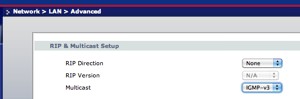
Multicast. That’s the secret. I remembered seeing a setting for that on the ZyXEL, which I didn’t think was on by default. Sure enough, on the Network > LAN > IP page of the router’s configuration screens, there’s an Advanced Setup button. Click that, and there’s an RIP & Multicast Setup section. Multicast was set to “None” on my system.
I had no idea which of the options to choose — IGMP-v1, 2 or 3 — so I just chose the biggest number, on the grounds that version 3 of things is generally better than version 1 or 2. As soon as I’d chosen that and hit “Apply”, everything started working just fine. 1Password started syncing, my Remote app started working, and I’m listening to music over the AirTunes speakers right now.
Also, as pointed out by andrea in the comments below, you may also need to disable IGMP snooping (Network→Wireless LAN→Advanced on my router) for a reliable connection.
So — got a problem with a ZyXEL router and your iPhone apps? Try enabling multicast!
31 Comments
ZyXEL UK
May 17, 2010On behalf of ZyXEL, apologies you had issues finding information relating to getting the Apple iPhone Remote App to work with a ZyXEL router. Thank you for highlighting this and we will add information to our Website on this subject to make it easier for future users. Our tech support team is always happy to help, they are available on 0845 122 0301.
Regards,
ZyXEL UK
Matt
May 17, 2010Thanks, ZyXEL! Nice to see you getting out here and engaging with the customers :)
Now everything’s up and running, I’m extremely happy with my new ZyXEL router; far better than the old Belkin one, and with the kind of detailed configuration options a geek likes to see, and very good wireless coverage.
Phil
July 23, 2010Hi,
I’m having the same problem with using the remote app on my iphone. I don’t have any software for the router so I can’t follow any of the instructions above. I have a mac but I can not see any options to enable multicast or IGMP.
Please help. I’ve been searching for the last 2 months for a solution!
Thanks,
Phil
Matt
July 25, 2010Hi Phil,
You don’t need software for the router, the router itself comes with the software (and the above configuration pages) pre-installed. You just use a web browser to view them.
I’d suggest going and asking at ZyXel support; I’m sure they’ll be able to talk you through it.
alessandra
July 26, 2010Hi,
THANK YOU SO MUCH ! I’ve had this issue of connexion between my computer and aiport express/airtunes since I switched from an old ZyXel to ZyXel 660H, I could not find a good solution online for several months and was really annoyed. You saved the day :-)
ZyXEL UK: you might want to say something about it to your counterparts Switzerland as ZyXEL is the most common router sent to customer of Sunrise, a large phone company… ;-)
alessandra
andrea
April 8, 2011For the rest of you with a P660HW-T1-v3 that try this and still failed to make it work here what sort in my router
Commands to enter at CLI
ether switch igmpsnooping disable
wlan mcenable 0
Matt
April 14, 2011Thanks for the extra info, Andrea. I guess this means that those of us with ZyXEL P‑660HNs should also make sure to disable “IGMP snooping” in Network->Wireless LAN->Advanced. Not sure whether there’s an equivalent of the “mcenable” setting for the P‑660HN; it doesn’t appear in the CLI.
Master B.
October 11, 2011Hey Thank’s.
That was the Point! disable “IGMP snooping”
Great!
Stan
May 23, 2012Andrea can u explain in steps what do do here as I cannot follow these commands
I have the same router as you a p669hw-t1-v3
kerem
June 23, 2011You are a life saver, I felt it was because of the router but I had no way of knowing. I’ve been searching for months for this. Thank you so much/
Chad
July 22, 2011Thank you so much for this thread!
My problem was with Airprint on a Zyxel P‑660HN.
I initially enabled Multicast IGMPv3 which allowed me to print once. I then unticked IGMP Snooping under WLAN settings, and now it seems to be working perfectly.
Thanks again!
Pansak
July 31, 2011Thank you Matt and Andrea. I checked this out many months ago and play around with multicast value .. unsuccessfully … now after I unchecked IGMP Snooping … it works perfectly.
Trump
August 9, 2011beside the clue mentioned in the article which identify the iTunes use MDNS, i found another big clue at http://packethq.com/2011/myth-behind-apple-itunes-and-airplay/ which describe the full process of the AirPlay
jazz
October 10, 2011Thanks so much for the help. I am a swiss sunrise zyxel P‑660hn owner and just got an apple tv. It didn’t work and finally found this (and some other forums). I was thinking that apple tv was a waste or that i would need a new router and getting angrier and angrier. Thanks to you guys everything is working perfectly and I can go to bed happilly!!!
alex
February 1, 2012hey matt,
cool this works for me! i had to uncheck IGMP as well with my 660HN.
thnx alot & hi5 from switzerlnd, alex
jos
February 25, 2012I have a Zyxel 660HN modem and couldn’t get my iPad to print consistantly via airprint. I unchecked the IGMP Snooping and it works perfectly. THANK YOU!
Eddie
March 15, 2012As jos said, THANK YOU…I love the Google and the web! Sorted my problem out.
Jb
April 8, 2012Thank you so much for this precious help.
From switzerland.
Alfredo Vogel
April 10, 2012thanks for that hint.
I have a Zyxel
P‑660HN-F1Z
and coulmd not make DropCopy work on my iMac and Mini: it kept loosing the destinations. With your hint it makes the whole of Bonjour work a treat!
Good research and brilliant explanation!
THANK YOU
Rich
July 7, 2012I’ve got an NBG4615 router and don’t experience any issues with my iphone but had major problems in streaming audio to my airport express when it was configured as a wireless device. I’ve tried the various workarounds presented here — really good stuff, but sadly nothing helped.
From what I can tell the configuration of NBG4615 differs from the P‑660HN, in that it doesn’t have IGMP-v3 and IGMP Snooping (which it refers to as IGMP Blocking) is an option from the WAN settings and only appears to relate to the LAN setup.
I’m really frustrated about this and the same issue seems to effect the NBG4604 and I very much suspect all the other NBG routers. I’ve reported this problem to Zyxel, who said they were aware of the issue but as yet unable to provide a solution. This unforgivable given that my router came out in 2010 and writing this in mid 2012 they still haven’t resolved this issue. Of course, if anybody knows of workaround solution which may work, please, please, post it here!
Reynout
August 10, 2012Hi,
Initially I thought: this is it! I followed all the steps including the snooping-bit, but still didn’t get my I‑phone (Ipad neither) to connect to the internet. It does ‘see’ the router (Zyxel P‑6660HN/FxZ) and I excluded encryption issues. (Without any security it still doesn’t want to make the step to go to the internet.)
Does anyone have an additional idea?
Reynout
Matt
August 13, 2012The problem described in the blog post shouldn’t affect the ability for an iPad or an iPhone to connect to the internet. I guess your problem is something else, I’m afraid, but I don’t know what it could be. My iPhone could already see the internet just fine before I started trying to get the iTunes stuff to work…
Rich
August 14, 2012Bit of a departure from what this blog post is about but I think its likely that this issue is caused by how your wireless network is configured.
Certain apple devices (such as the iPhone 3G or 3GS) can’t connect to a 802.11n only network. There can also be problems if the wireless network is set @ 40mhz. And ultimately wireless networks operating @ 2.4Ghz can be v. susceptible to interference and those @ 5Ghz tend to have a poor range — though I’m unsure if your router is capable of 5Ghz.
I’ve got a different type of Zyxel router from you, so other than suggesting that you try wireless channels 1, 6 or 11, I’m unable to explain what settings you could try changing. However, this may help: http://support.apple.com/kb/HT4199 — good luck!
joerg
September 10, 2012hello
i cant switch impg snooping on disabled on teh wireless lan, only at the wan and lan section.
does anybody know how to do it it this way?
thanks a lot
Abhijeet
September 10, 2012Thank you, Sir!
I shall always be grateful for the “Multicast” tip!
- An electronics and communication engineer who couldn’t fix his router even after reading 291 pages of user manual (and even referring to textbooks)
Nick
September 29, 2012Hi, I too had the same problems as mentioned above, and followed the advice given to successfully cure the problem.
The issue I now have (not sure if it is just me) is that ever since I carried out the modifications to the settings my router/internet connection freezes every single day.
All the lights remain on/green but none of my connected devices can access the internet. The only way to sure this is to switch the router off and back on again and bobs your uncle — all is fine again.
Has anyone else suffered this problem, and more importantly, found a cure for this?
John
December 5, 2012Hello,
I have huawei HG622u , I disabled snooping, enabled v3 IGMP but it doesnt work. I can ping AE, at the moment its playing music over itunes, but disappear from airport utility and when i quit itunes it will disappear too.
Any idea?
ercsrc
December 19, 2012Hi,
Anyone able to solve the issue on zyxel P‑661HNU-F1,
on settings tab it only lets you choose RIP version,
there is no IGMP setting.
Although on device specs it says there is IGMP v1‑2 – 3 support.
Please help if you have an idea,
many thanks
Chris
December 23, 2012Thanks Matt for this post!
I had a similar problem with a ZyXEL NBG4615 where the Bonjour service of my HP Wifi printer (latest firmware installed) was going on and off for my iPad. It turns out on this router you actually have to activate and then deactivate IGMP Multicast (under WAN -> Advanced)! Doesn’t make any sense, but I can reproduce it every time. A bug ?
And don’t forget to activate “Intra-BSS Traffic” for your SSID, so that Wifi devices can communicate with each other ! This was a new one for me too…
morgo
December 28, 2012works a treat with D‑Link routers too, in case anyone was wondering. Thanks for the tip Matt.
Aristot3lis
April 9, 2013Thanks, you saved me a lot of time trying finding a solution.